Compress PDF Online
Reduce PDF file size for easier sharing. Choose Original quality, Balanced or Smaller file and download PDFs individually or in a ZIP. Stronger image compression can soften fine details.
Compress PDF Online workspace
Choose compression around the content in your PDF
Start with Original quality when preserving image data matters more than file-size savings. Balanced and Smaller file can compress eligible embedded images; inspect scanned text and fine details after processing.A PDF that is already optimized may shrink little. Compare the saved size with the destination’s actual upload limit, and keep a readable result rather than choosing the smallest output automatically.
How to compress a PDF
- Add your PDFs. Choose files from your device or drag and drop them into the upload area.
- Choose Original quality, Balanced or Smaller file. Select Compress PDF or Compress PDFs, then follow the progress for each file.
- Review and download. Compare original and final file sizes. Download individual PDFs or save all completed results in a ZIP archive.
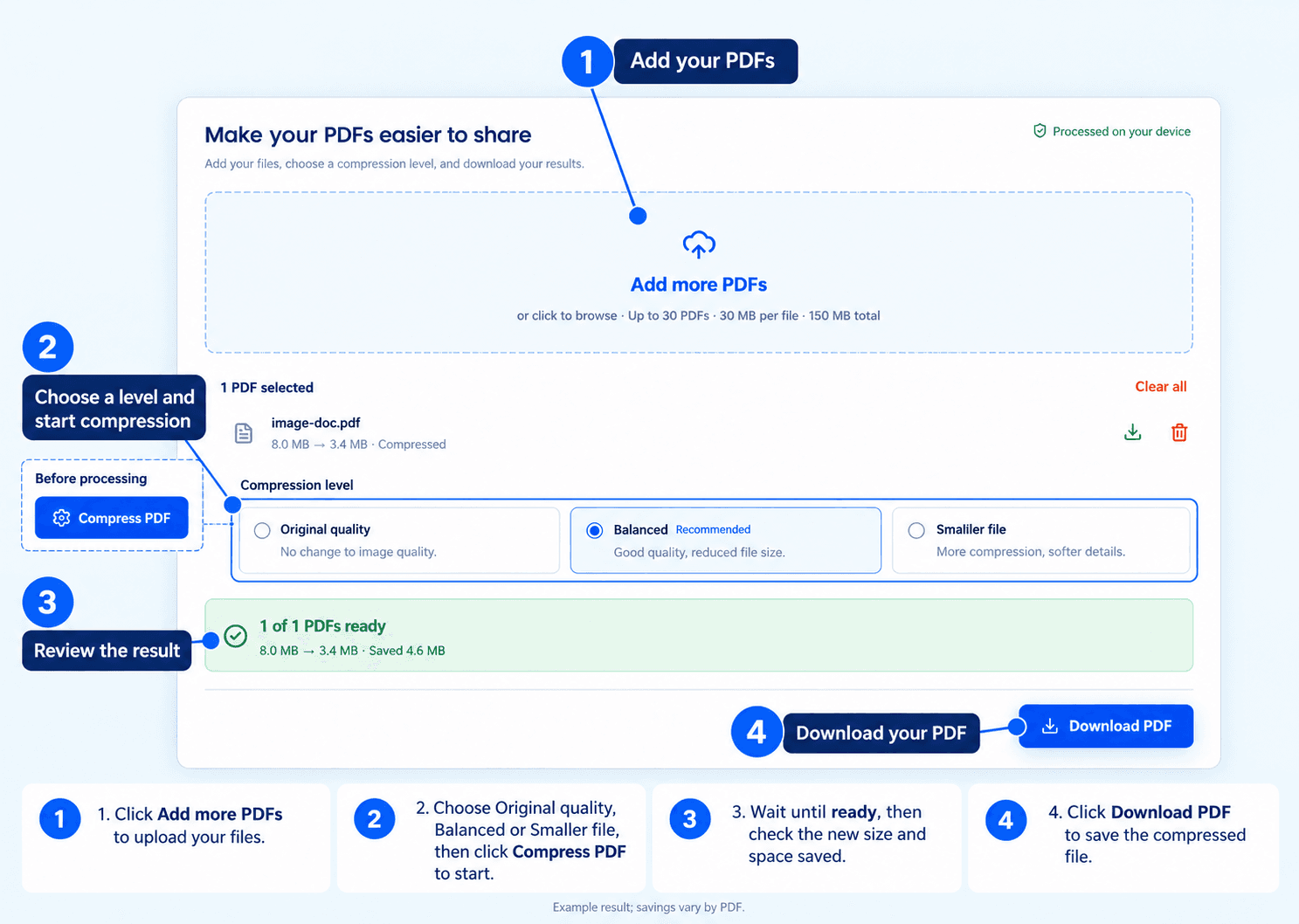
Add your PDFs, choose a compression level and start compression. Compare the resulting sizes and inspect the downloaded document. The illustrated 8.0 MB to 3.4 MB result is an example; savings vary by PDF.
Choose the right compression level
Original quality
Keep every image unchanged while optimizing the PDF structure. Choose this option when preserving image quality matters more than reducing file size. Savings may be modest, especially for PDFs that are already optimized.Balanced
Compress eligible images at their original resolution while maintaining good visual quality. This is the recommended starting point for everyday sharing, document uploads, and email attachments.Smaller file
Apply stronger compression to eligible images while keeping their pixel dimensions. Choose this option when a smaller download matters more than fine image detail. Photos and other image content may appear softer.Compress multiple PDFs in one batch
Add up to 30 PDFs at a time. Each file can be up to 30 MB, with a combined batch limit of 150 MB.Each PDF is processed separately, so the documents remain individual files. Review each result, download files individually, or use Download all to save the completed PDFs in a ZIP archive. If one file cannot be processed, the remaining files continue.
Preserve page dimensions and sharp text
The compressor is designed to keep original page dimensions and image pixel dimensions without converting entire pages into images. Open the downloaded file and check the text, links, vector graphics and any interactive features needed for your task. Do not assume a processed copy preserves digital-signature validity or every embedded feature.Image compression can still change fine details, even when resolution is unchanged. Choose Original quality when images must remain unchanged.
Why the output may not shrink enough
| Source | What to check |
|---|---|
| Already optimized PDF | There may be little redundant data left to remove. |
| Scanned or image-heavy PDF | Compare image detail after Balanced or Smaller file. |
| Mainly text or vector PDF | Image compression may have less effect; check the saved size. |
If processing would increase the PDF’s size, the tool retains the original. Password-protected files must be unlocked before processing. Compression levels do not guarantee an exact output size.
Have a business enquiry or a tool issue? Contact us.
Frequently asked questions
How can I reduce a PDF’s file size?
Upload the PDF, choose a compression level, and click Compress PDF. Review the result and download the file. Start with Balanced, then try Smaller file if you need additional size reduction.
Does PDF compression reduce image resolution?
This tool keeps image pixel dimensions and page dimensions unchanged. Balanced and Smaller file use image compression that may change fine details; Original quality leaves images unchanged.
Can I compress several PDFs together?
Yes. Upload up to 30 PDFs per batch, subject to the 30 MB limit per file and 150 MB combined limit. Download the completed PDFs individually or together in a ZIP archive.
Why is my PDF still the same size?
Some PDFs already use efficient compression or contain little image data to optimize. The tool keeps the original file whenever processing would make it larger.
Can I compress a PDF to an exact size?
The tool offers compression levels rather than a guaranteed target size. The final size depends on the original document and the selected level.
Are my PDFs uploaded for compression?
PDF Compressor processes selected PDF contents on your device. Website analytics and other network requests are separate from this file operation.